Viewing your account's activity log
What’s the activity log?
Section titled “What’s the activity log?”Feature Upvote’s activity log is a list of everything that happens in your account that might be interesting to you as an account admin. It is an audit that helps with traceability.
Security of SaaS products is a big concern. As a SaaS operator, we worry about security on your behalf. The activity log is part of our multi-faceted approach to security.
It includes:
- account creation, owner changes and trial extensions
- team member invitations, and user creation, activation, changes and deletion
- attempted account sign-ins, whether successful or not
- password changes, reset requests and resets
- board creation and deletion
- custom domain names being added or removed
- subscription creation, cancellation, plan changes and quantity changes
- API key creation and deletion
For API keys, the activity log shows the key’s name and who created or deleted it. It never shows the key itself.
Accessing the activity log
Section titled “Accessing the activity log”-
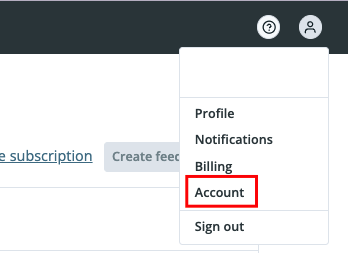
In your Feature Upvote account, click on the user icon in the top-right hand corner
-
Select “Account” from the drop-down menu
-
Select “Activity Log”
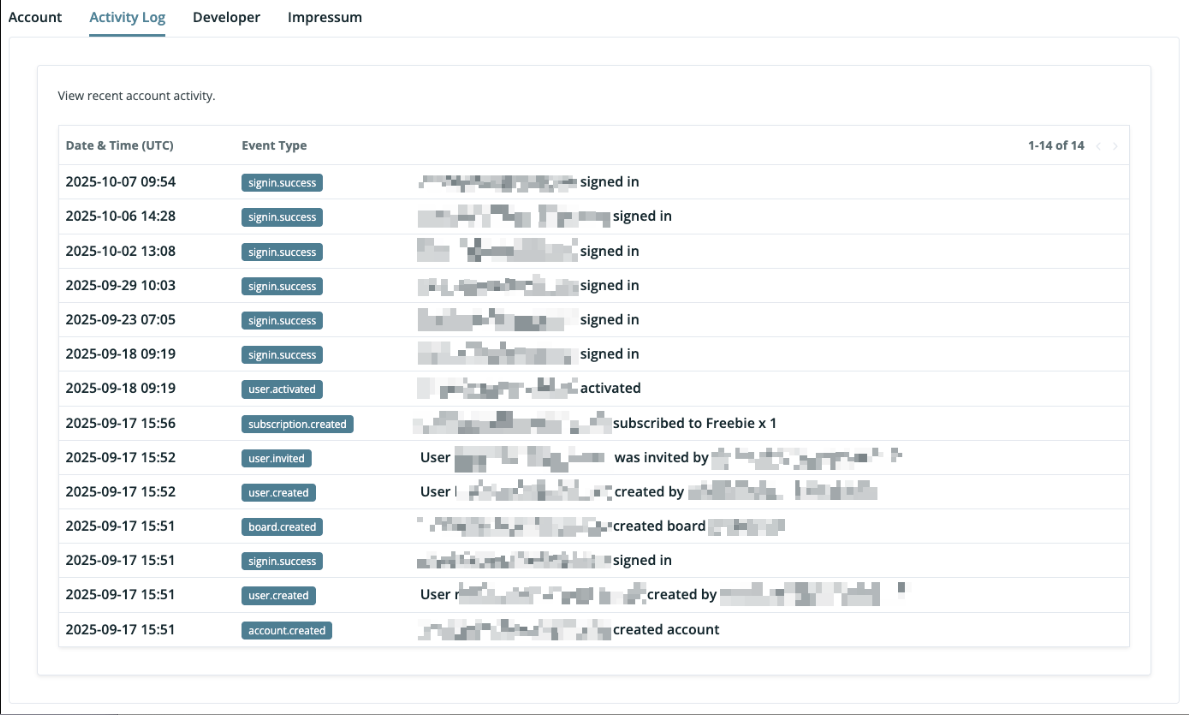
Or, if you are already signed in, go straight to https://app.featureupvote.com/dashboard/activitylog
Who can see the activity log?
Section titled “Who can see the activity log?”Only signed-in admin users can view the activity log.
What about privacy concerns?
Section titled “What about privacy concerns?”The activity log is only viewable by your Feature Upvote account’s admin users.
Data is kept for 12 months. An automated nightly task deletes older data.