Voting on behalf of customers
Introduction
Section titled “Introduction”Feature Upvote lets moderators add votes on behalf of customers (also called ‘proxy voting’). You might want to do this because:
- A customer sends in a support ticket with a feature request and you want to add a vote on behalf of that customer
- You want to keep your feedback board private so you use proxy votes for every feature request that comes in
How you vote on behalf of customers
Section titled “How you vote on behalf of customers”To make a proxy vote, click on the ‘Voting options’ button shown when viewing a suggestion. It is directly underneath the ‘Upvote’ button.
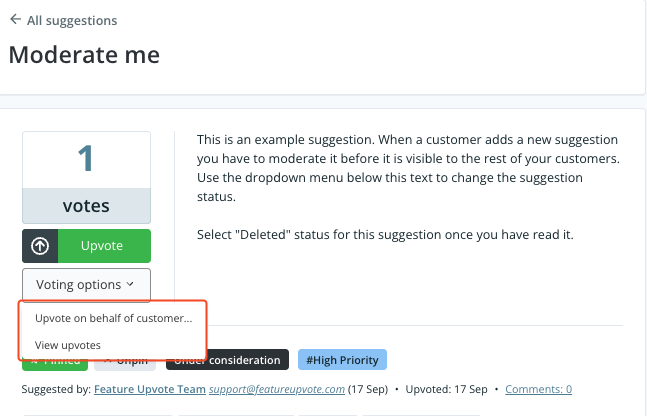
Select ‘Vote on behalf of customer’ and a dialogue box appears:
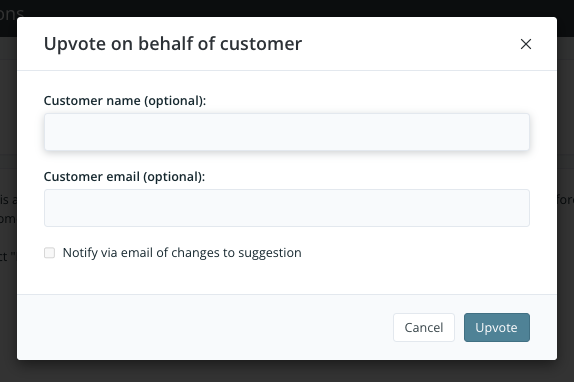
All fields are optional in this dialogue box, so you can simply click on the ‘Upvote’ button, and the new vote is recorded.
A moderator can make an unlimited number of proxy votes for each suggestion.
Viewing proxy upvotes
Section titled “Viewing proxy upvotes”To see a list of all votes, including proxy votes, select ‘View upvotes’ from the ‘Voting options’ menu.
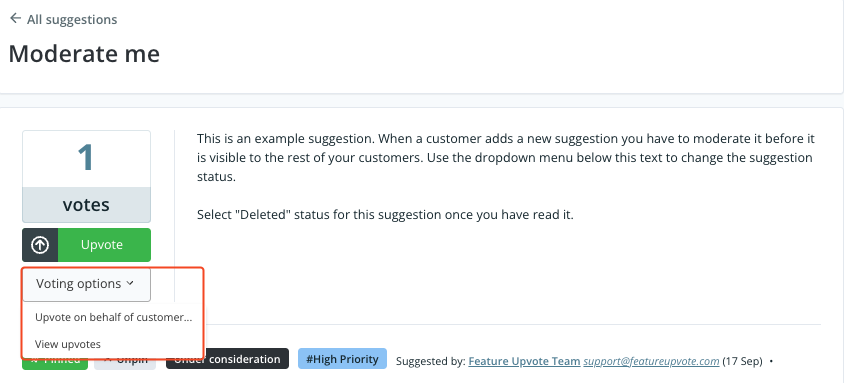
This list contains names and email addresses for votes, when available.
Encouraging customers to vote themselves
Section titled “Encouraging customers to vote themselves”If you’ve decided to make your feedback board public, you may want to encourage customers to upvote suggestions themselves. This will save your team time and increase the effectiveness of your board.
Read our article on How to get and manage customer feedback for tips on how to encourage customer ‘self-service’.
However, some teams make a strategic decision to upvote all suggestions that come in via other channels rather than asking customers to visit the feedback board.